# Network Variables
## General:
ObjectNet provides the facility to keep variables synchronized over the network.
Those variables are automatically synchronized over the network from Active to Passive instances.
{% hint style="info" %}
**To implement Network Variables, the script must be inherited from ****NetworkBehaviour**
{% endhint %}
Network variables can synchronize the following types:
int   uint   long   ulong   short   ushort   float   double
-------------------------------------------------------------
byte   sbyte   byte[]   bool   string   char   char[]   enum
-------------------------------------------------------------
Vector2   Vector3   Vector4   Quaternion   Color   Matrix4x4
can be used in two ways.
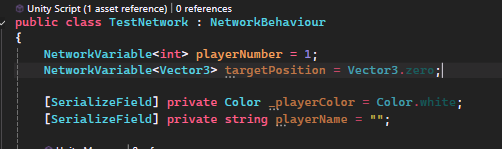
* [By NetworkPrefabs](#user-content-fn-1)[^1] ( see [script-variables](https://onlineobject.gitbook.io/objectnet/general/network-components/network-prefabs/script-variables "mention") )
* [By Code ](#user-content-fn-2)[^2]
By NetworkPrefabs Database example
***
## Network Variables by code:
To use Network Variable in code they must bound a type NetworkVariable\ where T must be included into allowed types.
```csharp
private NetworkVariable variable = 0;
```
Once defined you can use it as if any other script variable
```csharp
this.variable += 1;
int variableValue = this.variable;
```
This provides greater control and access to various callbacks you can leverage. Below are some examples:
Detecting Changes
You can detect when the object was updated on the passive instance to apply changes only when occur.
```csharp
this.variable.OnValueChange((int oldValue, int newValue) => {
Debug.Log($"Value was updated from {oldValue} to {newValue} ");
});
```
{% hint style="info" %}
Note: This will only be triggered on passive object
{% endhint %}
{% hint style="danger" %}
Important: Modifying the value of a `NetworkVariable` **directly on a passive object** can disrupt its internal synchronization logic.\
This may prevent the `OnValueChanged` callback from being triggered in the future—even when a new value is received from the active owner. \*unless you used variable.SetValue()
{% endhint %}
Synchronizing local variables
ObjectNet allows to synchronization of network variables with local variables automatically. The following script allows you to keep a local variable synchronized with a network variable, no matter where you change the value, both variables will have the same value.
```csharp
NetworkVariable variable = "Hello world";
string localVariable = "Start text";
this.variable.OnSynchonize(() => { return this.localVariable; },
(string value) => { this.localVariable = value; });
// In this case variable Network will also receive the new value "New value from local"
this.localVariable = "New value from local";
// In this case local variable will also receive the new value "New value from Network Variable"
this.variable = "New value from Network variable";
```
{% hint style="danger" %}
**Important:** Never modify the value of a networked variable on a **passive** object, especially if it uses **Reliable** DeliveryMode. This can interfere with the value sent from the **active** source and cause players to see different results (desync).
{% endhint %}
***
## Variables DeliveryModes:
there are two Modes NetworkVariables uses **Reliable** and **Unreliable** [delivery-mode](https://onlineobject.gitbook.io/objectnet/general/fundamentals/delivery-mode "mention").
{% tabs fullWidth="false" %}
{% tab title="Reliable Variables" %}
Reliable variables send data only when it detects changes or when a new client join, This makes them ideal for **data that changes infrequently**, as they reduce bandwidth usage and ensure consistency.
{% hint style="warning" %}
Avoid using Reliable mode for variables that change frequently (e.g., more than once per second), as it may overwhelm the network and introduce latency.
{% endhint %}
#### *Examples of Reliable variables:*
Health, Player name / username, Score / Points, Kill / death count (K/D), Game state (Win/Loss, Start Match, Pause), Quest or mission updates, Timers, lobby settings, Inventory items, map selection, Skins selection, Environmenatl states (e.g., doors open) , etc...
{% hint style="info" %}
By defalue all NetworkVaraibles will be using Reliable DelivaryMode
{% endhint %}
{% endtab %}
{% tab title="Unreliable Variables" %}
Unreliable variables are sent At a **constant rate** through the network object’s update loop, Using a lightweight, **unreliable buffer,** making it fast for frequently changing variables (more than once per second constantly).
{% hint style="info" %}
Unreliable variable could arrive **out of order or not at all, making it bad for timers and critical game events**
{% endhint %}
#### *Examples of Unreliable variables:*
Input, Position , Target Position, Rotation, Animation parameters, Aim direction / camera look
{% endtab %}
{% endtabs %}
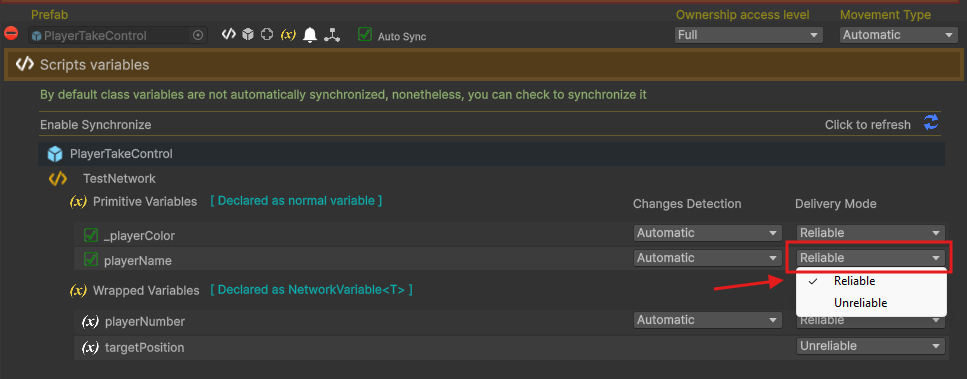
Change Delievry Mode from Prefab Database
You can change the Network Variable Delivary Mode from the Network Manager Prefab DataBase as shown in the second Image
Change Delievry Mode in code
You can change the Network variable Delivary Mode from Reliable to Unreliable through code
```csharp
private NetworkVariable variable = 0;
private void Awake(){
this.variable.SetDeliveryMode(DeliveryMode.Unreliable);
}
```
{% hint style="danger" %}
Note: You should only change Delivary Mode in Awake() changing it mid game may cause unexpected behavoiur
{% endhint %}
***
Changes Detection Mode (In Reliable Variables)
#### 🛠️ Automatic Detection Mode
By default, all `Reliable Variables`in ObjectNet use **Automatic Detection Mode**. In this mode, ObjectNet continuously monitors variable changes and efficiently **packs all detected changes into a single buffer**, reducing bandwidth usage and improving performance.
The detection rate is tied to the Object **send rate**, ensuring that:
* Only variables with actual changes are included in the update buffer.
* If no changes occur, **no network packets are sent**, optimizing traffic flow.
***
#### 🛠️ Manual Detection Mode
When you mark a variable as **Manual Detection**, ObjectNet will not sync it automatically. The developer take full responsibility for sending these reliable variables by themself.
To send all **Manual Reliable** variables across all objects use:
```csharp
NetworkManager.Instance().DetectVariablesChanges(bool includeAutomatic = false);
```
{% hint style="info" %}
This method does **not immediately send variable data**. It simply Invalidate all variables, allowing them to be detected and included in the next regular send cycle.
{% endhint %}
***
📝 **Note:**
If you are using [Warpped Variables](#user-content-fn-3)[^3] you can force an individual variable to be included in the next synchronization cycle by calling:
```csharp
variableName.Invalidate();
```
This manually flags the variable as changed, ensuring it is sent even if its value hasn't been modified.
***
## FAQ:
What if I want to modify a variable from a passive object?
You **cannot directly modify** a variable on a **passive** object, as the change will **not be synced** across other clients.\
To update the value correctly, you should **send an** [**RPC**](#user-content-fn-4)[^4] to the **active** object and let it handle the modification. This ensures that the update is properly synced for everyone.
```csharp
NetworkVariable health = 100;
// Anywhere in your code (on active or passive)
NetworkExecute(Damage, 20);
// This ensures the value is only changed by the active instance
private void Damage(int damage){
if (IsActive())
health -= damage;
}
```
💡 Even passive objects can call `NetworkExecute`, but the logic inside will only run on the active side — keeping everything in sync.
[^1]: Mostly used to sync primitive variables., without the need to declare them as NetworkVariable\ in code
[^2]: Uses Warpper variables declared as NetworkVariable\, syncs without the need to set them in the NetworkPrefab.
[^3]: Declared as NetworkVariable\
[^4]: NetworkExecute as explained in [network-methods](https://onlineobject.gitbook.io/objectnet/general/network-behaviour/network-methods "mention")