# Network Debugger
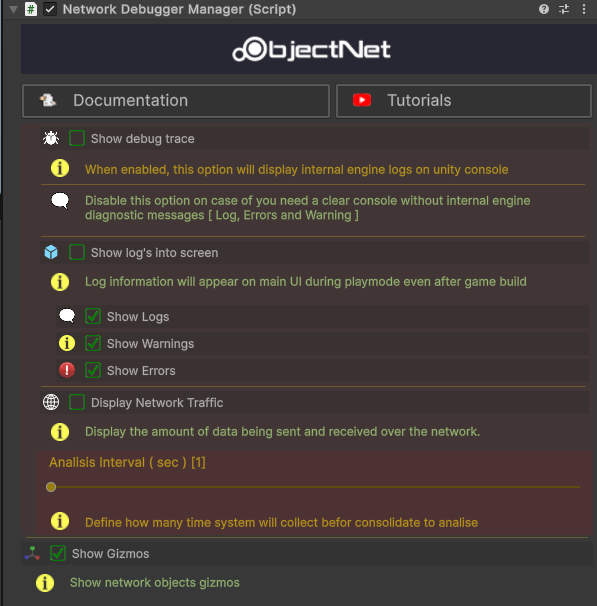
ObjectNet includes a built-in **Network Debugger Manager** to help developers monitor and troubleshoot networking behaviors in real-time. This tool provides runtime diagnostics that make debugging easier during development and playtesting.
Show Debug Trace
Enables internal engine logs in the Unity Console.
* Useful for inspecting internal events and messages.
* Includes logs, warnings, and errors from ObjectNet.
> Disable this option if you prefer a cleaner console output.
Show Logs on Screen
Displays diagnostic logs directly on the game screen — even during play mode or in a built build.
* Helps track logs without needing to check the Unity Console.
* Supports toggling individual categories:
* ✅ Show Logs
* ⚠️ Show Warnings
* ❌ Show Errors
Display Network Traffic
Visualizes the amount of data being sent and received over the network.
* Helps analyze bandwidth usage and detect performance issues.
* **Analysis Interval (sec)**: Sets how frequently data is collected and visualized.
Show Gizmos
Displays network-related gizmos in the Unity Scene view.
* Useful for identifying and interacting with networked objects visually.
The Network Debugger Manager is an essential tool for:
* Realtime network performance analysis
* On-screen logging in both editor and builds
* Fine-tuning and troubleshooting multiplayer behavior
Use it during development to **catch issues early** and optimize your network logic with confidence.